Anleitungen
- Install nightly SOGo
- let's encrypt
- Install Bookstack
- Fortigate - Multiple Azure SAML IdPs
- Linux Mailserver
- Bookstack anpassen
Install nightly SOGo
apt install dovecot-sieve dovecot-managesieved
auth_username_format = %Ln
Dovecot IMAP
/etc/pam.d/dovecot
auth    sufficient      pam_ldap.so
auth    required        pam_unix.so     nullok
account sufficient      pam_ldap.so
account required        pam_unix.so
session required        pam_mkhomedir.so skel=/etc/skel umask=0022
session sufficient      pam_ldap.so
Add Repository
See details here https://www.sogo.nu/download.html
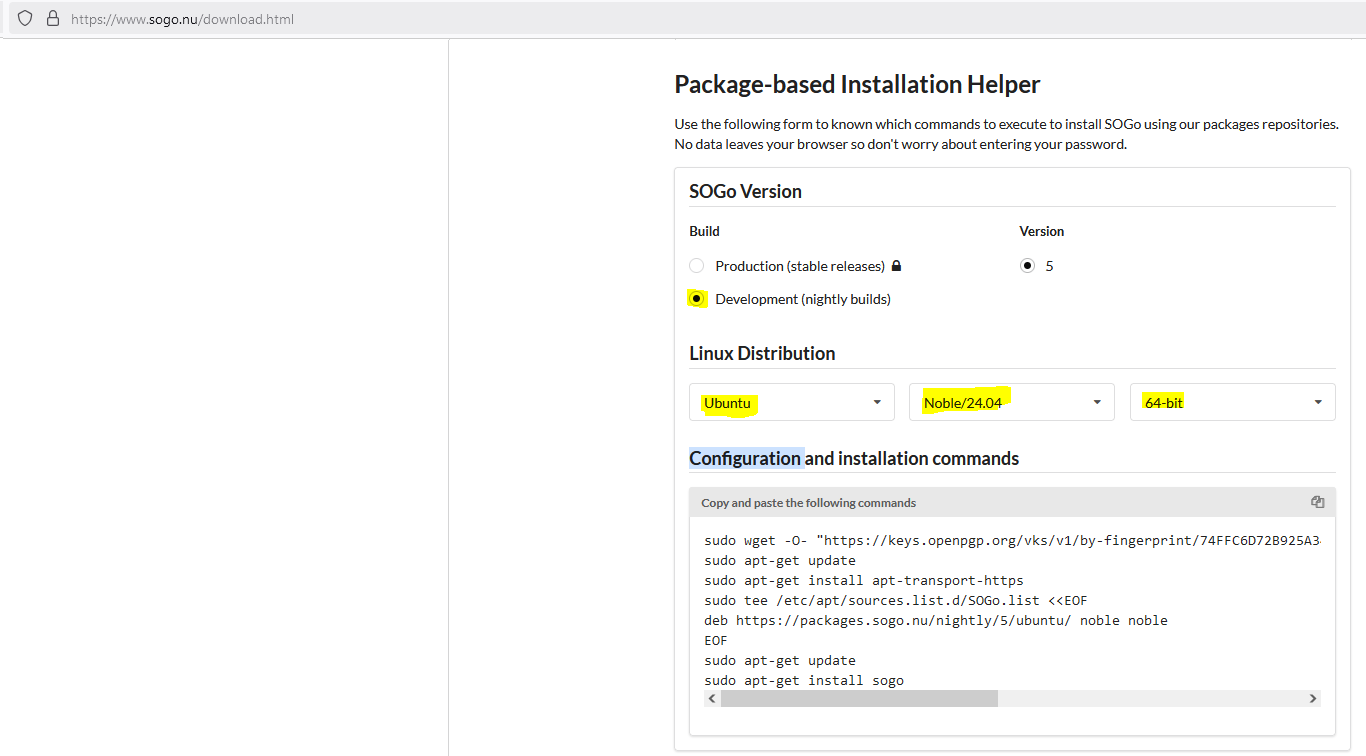
MariaDB
vi /etc/mysql/conf.d/mysql.cnf
[mysql]
default-character-set=utf8

[mysqld]
character_set_server=utf8
character_set_client=utf8

[client]
default-character-set=utf8
mysql
create database sogo;
CREATE USER 'sogouser'@'localhost' identified by '************';
grant CREATE,ALTER,SELECT,INSERT,UPDATE,DELETE on `sogo`.* to 'sogouser'@'localhost';
FLUSH PRIVILEGES;
exit;mysql -D sogo < /root/temp/sogo-5.11.2.20250115/Scripts/mysql-utf8mb4.sql
Info
https://www.sogo.nu/files/docs/SOGoInstallationGuide.html
https://wiki.archlinux.org/title/Dovecot
Imap sync
https://stew.au/musings/using-imapsync-and-ubuntu-22-04-to-ditch-gmail/
let's encrypt
Create certificate
certbot certonly -d *.h09.org --preferred-challenges dns-01 --manual -m ok@h09.org
Update certificate
/etc/crontab
# Certbot45 10 * * 1 root /usr/bin/certbot renew -q
Install Bookstack
Info
https://www.atlantic.net/dedicated-server-hosting/how-to-install-bookstack-on-ubuntu-22-04/
https://www.howtoforge.com/how-to-install-bookstack-on-ubuntu-20-04/
Fortigate - Multiple Azure SAML IdPs
SAML bei Azure einrichten
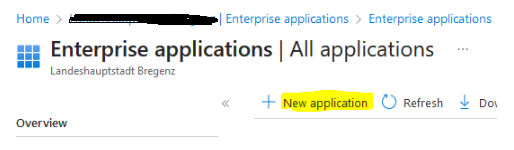
Neue Applikation hinzufügen
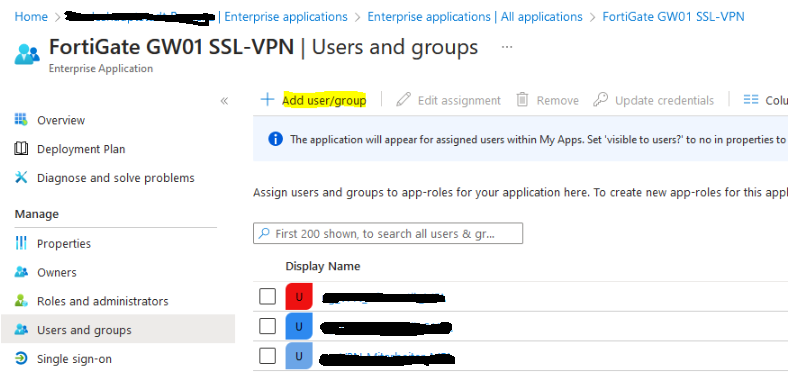
Benutzergruppen berechtigen
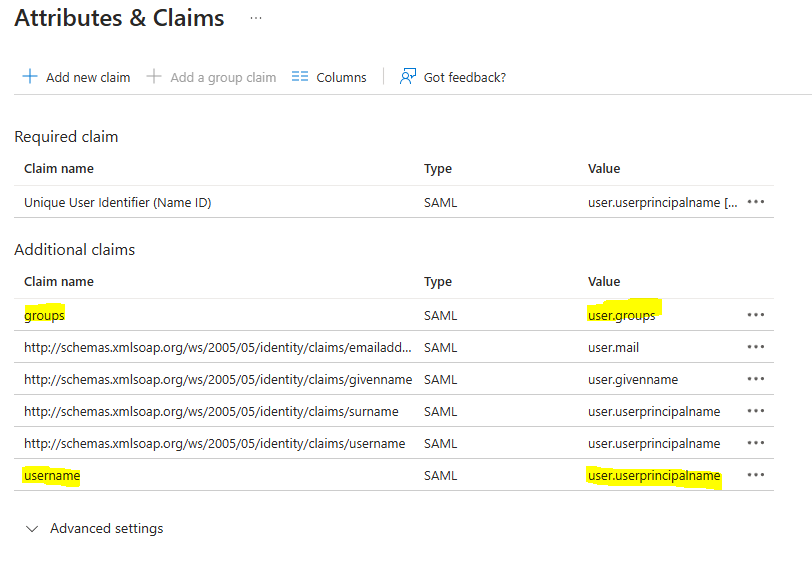
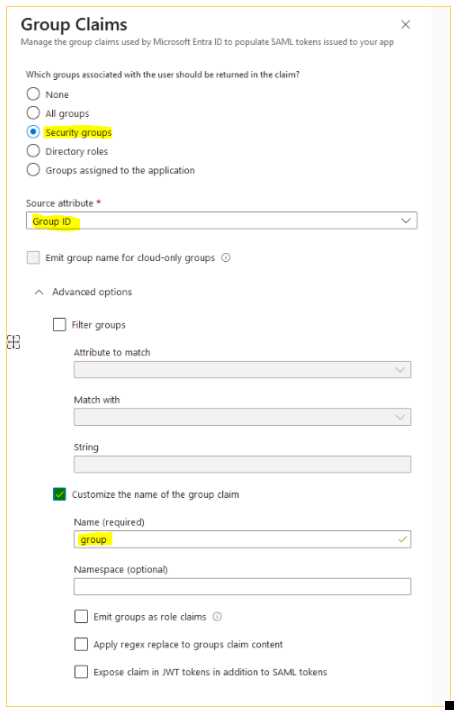
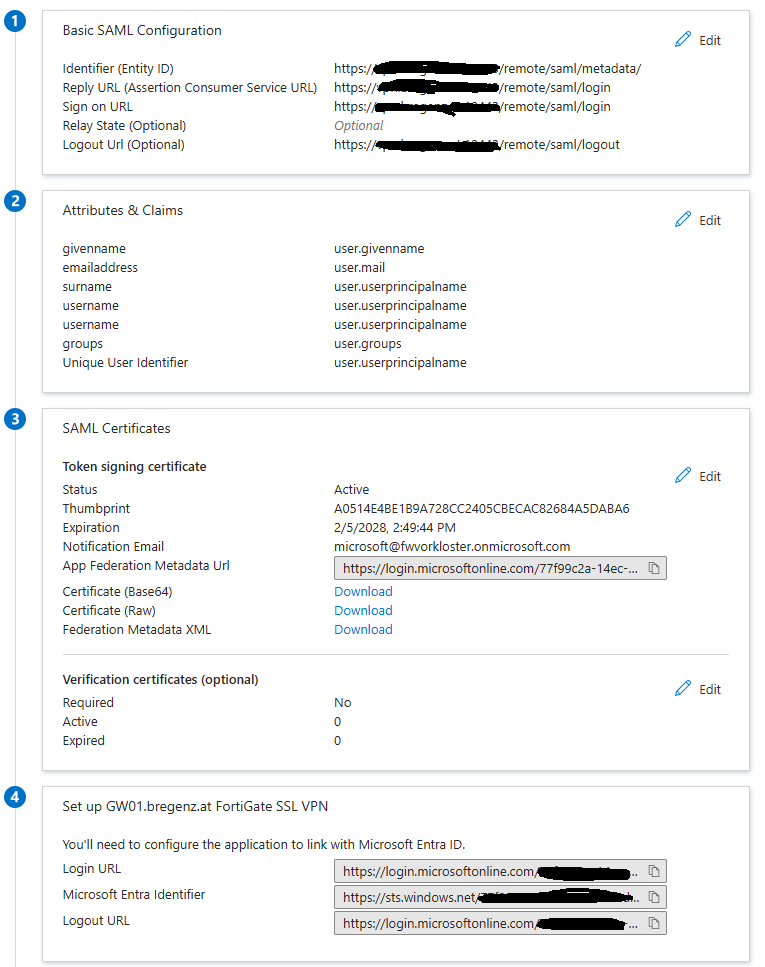
SAML einrichten
Gruppe und Benutzer Name muss in einer Form übertragen werden die die Fortigate verarbeiten kann.
Fortigate SAML einrichten
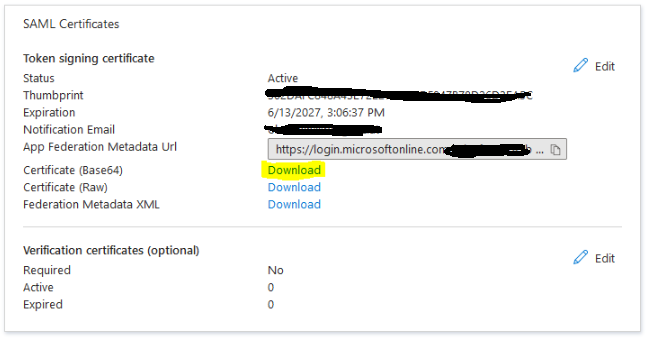
Zertifikat auf der Fortigate installieren
Herunterladen
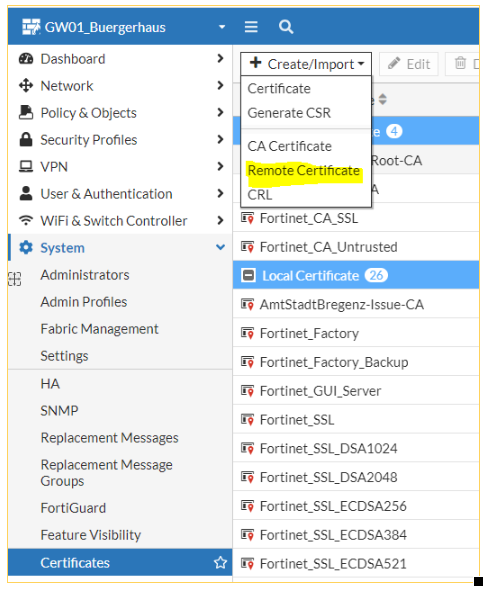
Auf Fortigate installieren
SSO Authenticator per CLI einrichten
config user saml
edit "SAML_Azure_VPN"
set cert "*********-wc-2023"
set entity-id "https://*********:******/remote/saml/metadata/"
set single-sign-on-url "https://*********:*****/remote/saml/login"
set single-logout-url "https://*********:*****/remote/saml/logout"
set idp-entity-id "https://sts.windows.net/*********/"
set idp-single-sign-on-url "https://login.microsoftonline.com/*********/saml2"
set idp-single-logout-url "https://login.microsoftonline.com/*********/saml2"
set idp-cert "REMOTE_Cert_3"
set user-name "username"
set group-name "groups"
set digest-method sha1
Um auf eine Gruppe filtern zu können, muss als Gruppennamen die Object ID der Azure Gruppe eingetragen werden. Die Werte "username" und "groups" sind case sensitive!
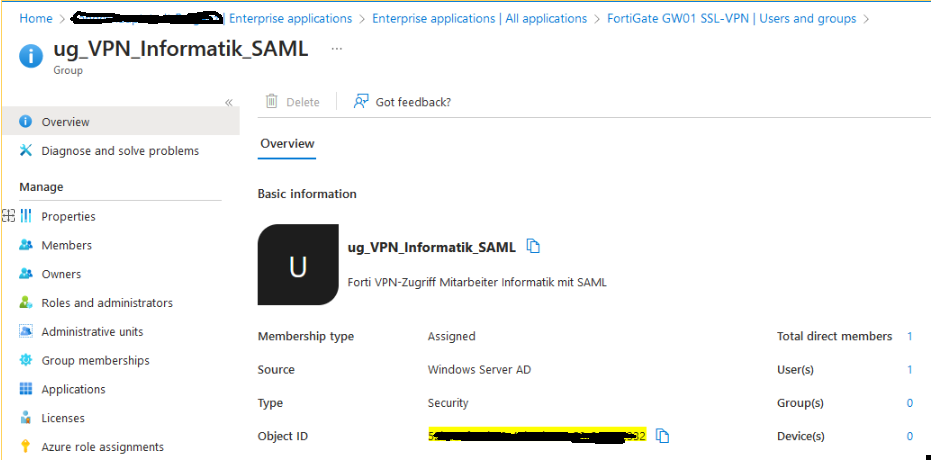
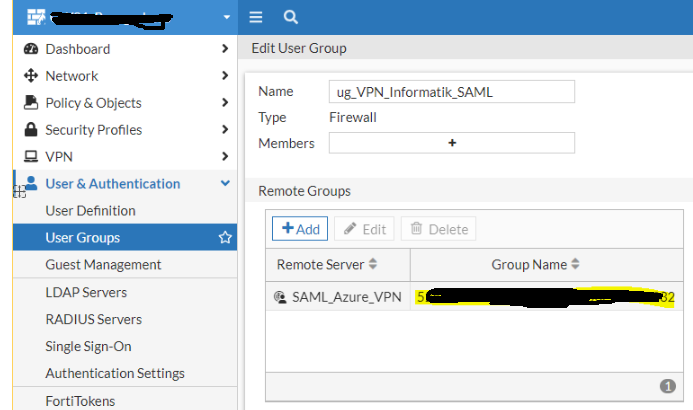
Der Rest ist Standard.
SSL-VPN Portal erstellen
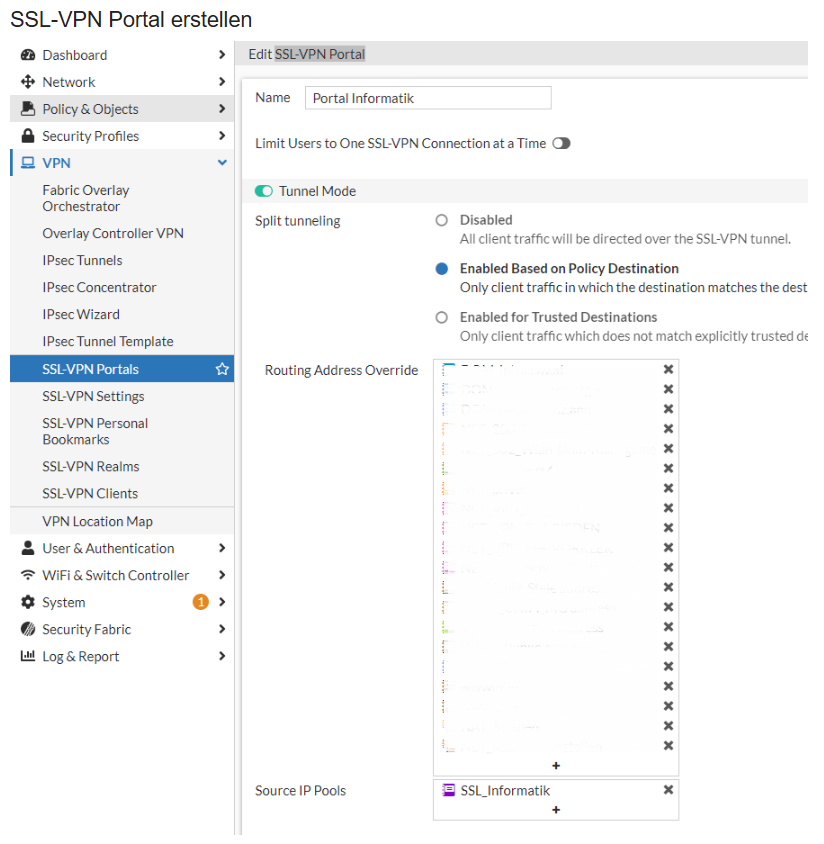
In SSL-VPN Settings zuweisen


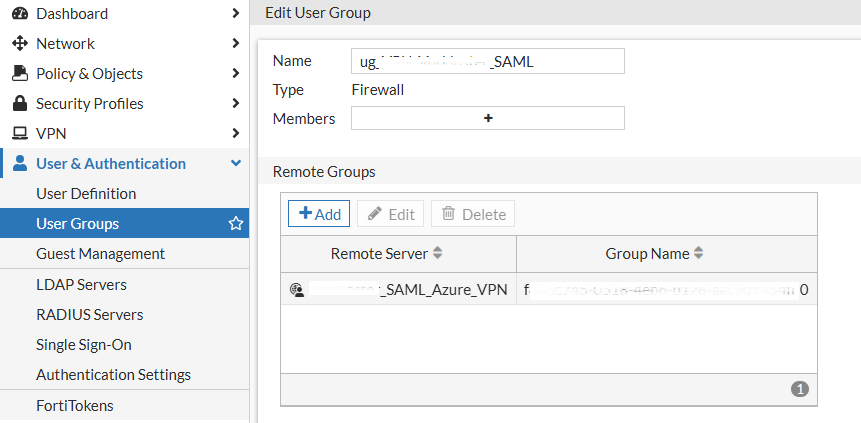
Gruppe einer Policy zuweisen
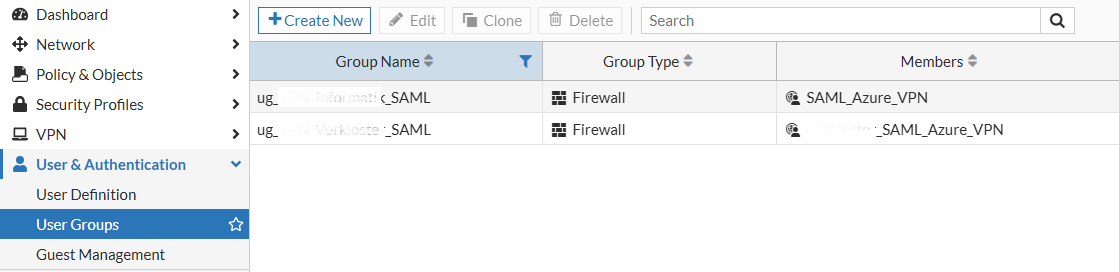
Debug
diag debug reset
diagnose vpn ssl debug-filter clear
diagnose debug application authd -1
diagnose debug application samld -1
diagnose debug application sslvpn -1
diagnose debug console timestamp enable
diagnose debug enable
Info
https://yura.stryi.com/en/2021-03-05/fortigate-ssl-vpn-azure-mfa/
https://learn.microsoft.com/en-us/entra/identity/saas-apps/fortigate-ssl-vpn-tutorial
https://learn.microsoft.com/en-us/entra/identity/hybrid/connect/how-to-connect-fed-group-claims
Linux Mailserver
Anti Spam - Postfix, Amavisd-milter, Spamassain
apt install pyzor clamav-milter dkimpy-milter amavisd-milter postfix-policyd-spf-pythonPostfix
Master.cf
127.0.0.1:10025 inet n  -               n         -               -      smtpd
        -o content_filter=
        -o local_recipient_maps=
        -o relay_recipient_maps=
        -o smtpd_restriction_classes=
        -o smtpd_client_restrictions=
        -o smtpd_helo_restrictions=
        -o smtpd_sender_restrictions=
        -o smtpd_recipient_restrictions=permit_mynetworks,reject
        -o mynetworks=127.0.0.0/8
        -o smtpd_authorized_xforward_hosts=127.0.0.0/8
        -o strict_rfc821_envelopes=yes
        -o smtpd_error_sleep_time=0
        -o smtpd_soft_error_limit=1001
        -o smtpd_hard_error_limit=1000
        -o receive_override_options=no_address_mappings

# SPF check
policyd-spf  unix  -       n       n       -       0       spawn
    user=policyd-spf argv=/usr/bin/policyd-spf
main.cf
smtpd_recipient_restrictions = permit_mynetworks,
        permit_sasl_authenticated,
        reject_unauth_destination,
        check_policy_service unix:private/policyd-spf,
        reject_unlisted_recipient,
       check_sender_access hash:/etc/postfix/sender_access,
        reject_non_fqdn_recipient,
        reject_unknown_recipient_domain,
        reject_unknown_sender_domain,
        reject_non_fqdn_hostname,
        reject_unknown_hostname,
        reject_non_fqdn_sender,
        reject_non_fqdn_recipient,
        reject_invalid_hostname

smtpd_helo_restrictions =
        permit_sasl_authenticated,
        permit_mynetworks,
        reject_invalid_hostname,
        reject_unknown_hostname,
        reject_non_fqdn_hostname,
        reject_unknown_sender_domain,
        reject_non_fqdn_sender

smtpd_client_restrictions =
        permit_sasl_authenticated,
        permit_mynetworks,
        reject_unknown_client

smtpd_helo_required=yes
content_filter = smtp-amavis:[127.0.0.1]:10024

# SPF check
policyd-spf_time_limit = 3600
/etc/crontab
59 3 * * * root sa-update --allowplugins --channel updates.spamassassin.org; sa-compileadduser clamav amavis
adduser amavis clamavrazor-admin -create
razor-admin -register
pyzor discoverSPF Check
smtpd_recipient_restrictions =
    ...
    reject_unauth_destination,
    check_policy_service unix:private/policyd-spf,
    ...
OpenDKIM
DMARC
Amavisd-milter
Spamassassin
mysql
create database spamassassin;
CREATE USER 'spamassassin'@'localhost' identified by '**************';
grant CREATE,ALTER,SELECT,INSERT,UPDATE,DELETE on `sogo`.* to 'spamassassin'@'localhost';
FLUSH PRIVILEGES;
exit;
mysql -u root -p spamassassin < /usr/share/doc/spamassassin/sql/bayes_mysql.sql
mysql -u root -p spamassassin < /usr/share/doc/spamassassin/sql/awl_mysql.sql
mysql -u root -p spamassassin < /usr/share/doc/spamassassin/sql/decodeshorturl_mysql.sql
mysql -u root -p spamassassin < /usr/share/doc/spamassassin/sql/txrep_mysql.sql
/usr/bin/sa-learn --spam /home/ok/Maildir/.Junk/cur
/usr/bin/sa-learn --ham /home/ok/Maildir/cur
Bookstack anpassen
Änderungszeiten usw. bei Book und Pages ausbenden
/var/www/bookstack/resources/views/books/show.blade.php
@section('right')
    <div class="mb-xl">
        <h5>{{ trans('common.details') }}</h5>
        <div class="blended-links">
=> entfernen "@include('entities.meta', ['entity' => $page, 'watchOptions' => $watchOptions])"
            @if($book->hasPermissions())
                <div class="active-restriction">
                    @if(userCan('restrictions-manage', $book))
                        <a href="{{ $book->getUrl('/permissions') }}" class="entity-meta-item">
                            @icon('lock')
                            <div>{{ trans('entities.books_permissions_active') }}</div>
                        </a>
                    @else
                        <div class="entity-meta-item">
                            @icon('lock')
                            <div>{{ trans('entities.books_permissions_active') }}</div>
                        </div>
                    @endif
                </div>
            @endif
        </div>
    </div>
/var/www/bookstack/resources/views/pages/show.blade.php
@section('right')
    <div class="mb-xl">
        <h5>{{ trans('common.details') }}</h5>
        <div class="blended-links">
=> entfernen "@include('entities.meta', ['entity' => $page, 'watchOptions' => $watchOptions])"
            @if($book->hasPermissions())
                <div class="active-restriction">
                    @if(userCan('restrictions-manage', $book))
                        <a href="{{ $book->getUrl('/permissions') }}" class="entity-meta-item">
                            @icon('lock')
                            <div>{{ trans('entities.books_permissions_active') }}</div>
                        </a>
                    @else
                        <div class="entity-meta-item">
                            @icon('lock')
                            <div>{{ trans('entities.books_permissions_active') }}</div>
                        </div>
                    @endif
                </div>
            @endif
        </div>
    </div>