# Fortigate - Multiple Azure SAML IdPs

<span data-cke-copybin-start="1">​</span>

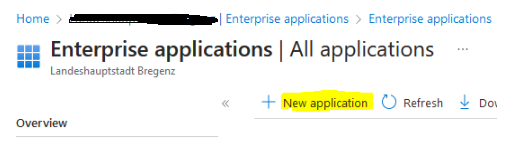
# SAML bei Azure einrichten

## Neue Applikation hinzufügen

[![image.png](https://maus.h09.org/uploads/images/gallery/2025-02/scaled-1680-/I9dimage.png)](https://maus.h09.org/uploads/images/gallery/2025-02/I9dimage.png)
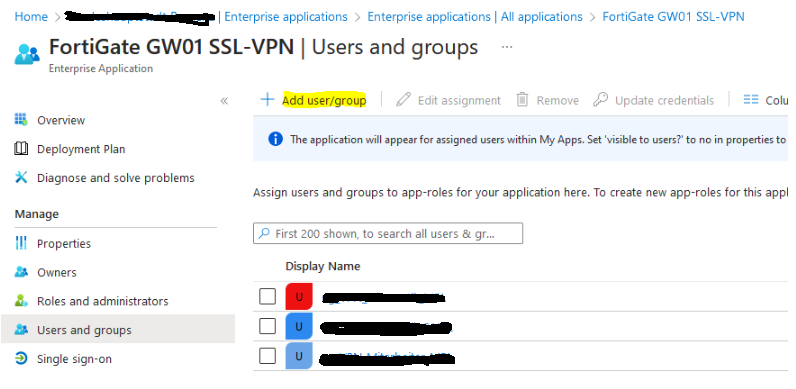
## Benutzergruppen berechtigen

[![image.png](https://maus.h09.org/uploads/images/gallery/2025-02/scaled-1680-/LZrimage.png)](https://maus.h09.org/uploads/images/gallery/2025-02/LZrimage.png)
## SAML einrichten

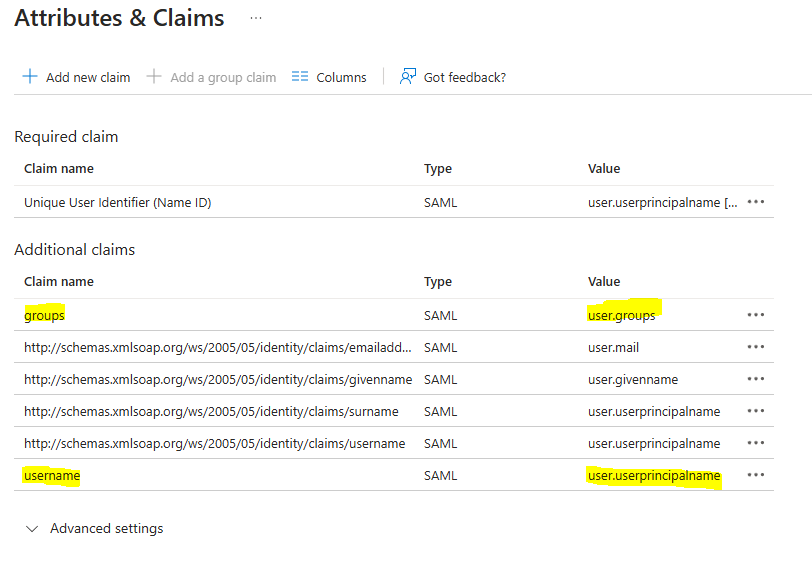
**Gruppe und Benutzer Name muss in einer Form übertragen werden die die Fortigate verarbeiten kann.**

[![image.png](https://maus.h09.org/uploads/images/gallery/2025-02/scaled-1680-/W9timage.png)](https://maus.h09.org/uploads/images/gallery/2025-02/W9timage.png)
[![image.png](https://maus.h09.org/uploads/images/gallery/2025-02/scaled-1680-/4Raimage.png)](https://maus.h09.org/uploads/images/gallery/2025-02/4Raimage.png)
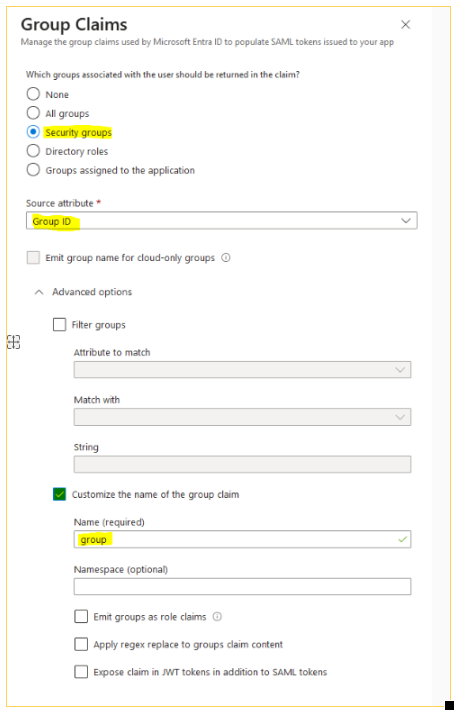
[![image.png](https://maus.h09.org/uploads/images/gallery/2025-02/scaled-1680-/TH7image.png)](https://maus.h09.org/uploads/images/gallery/2025-02/TH7image.png)
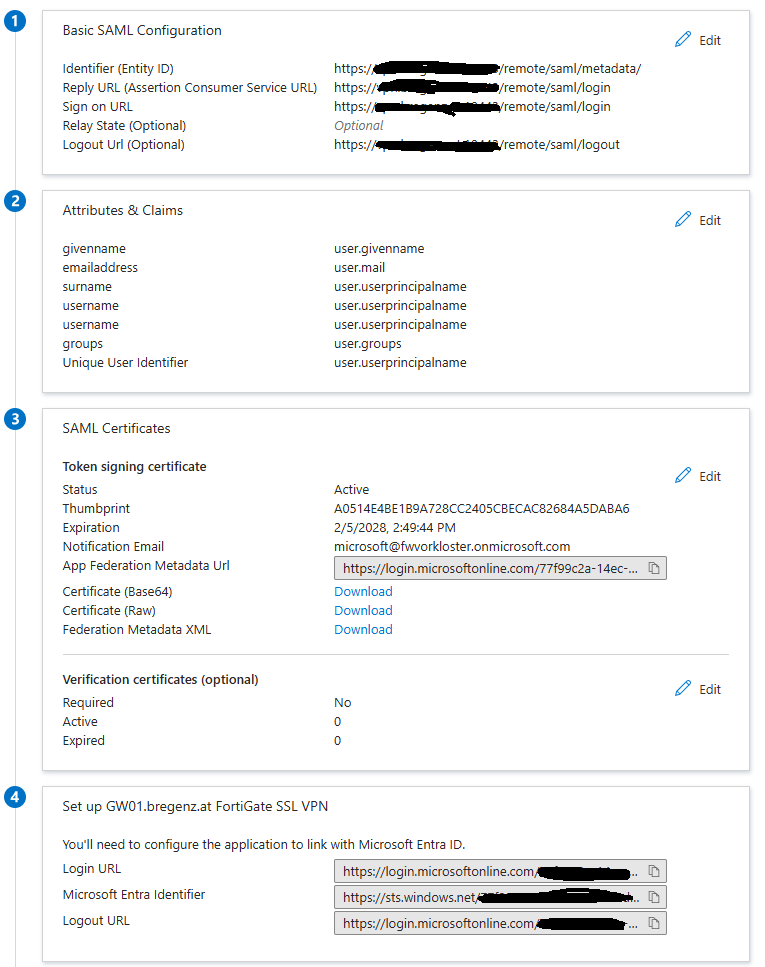
<div class="wikimodel-emptyline" id="bkmrk--7">  
</div># Fortigate SAML einrichten

<div class="wikimodel-emptyline" id="bkmrk--8">  
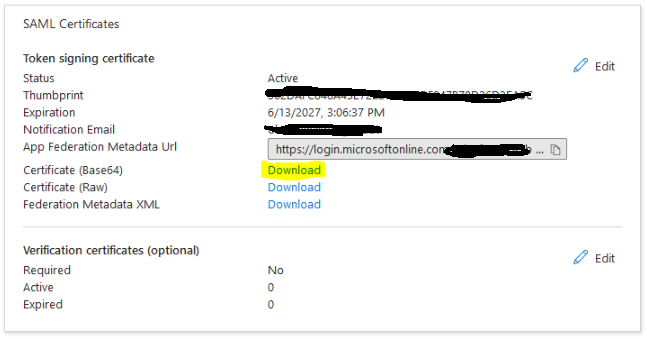
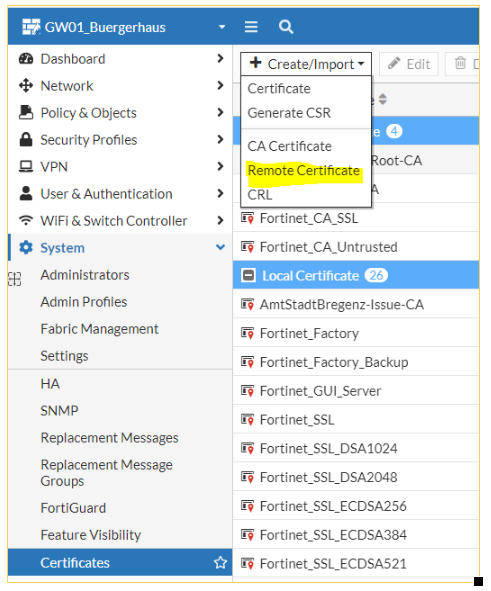
</div>## Zertifikat auf der Fortigate installieren

Herunterladen

[![image.png](https://maus.h09.org/uploads/images/gallery/2025-02/scaled-1680-/qj7image.png)](https://maus.h09.org/uploads/images/gallery/2025-02/qj7image.png)
Auf Fortigate installieren

[![image.png](https://maus.h09.org/uploads/images/gallery/2025-02/scaled-1680-/Xomimage.png)](https://maus.h09.org/uploads/images/gallery/2025-02/Xomimage.png)
<div class="wikimodel-emptyline" id="bkmrk--11">  
</div>SSO Authenticator per CLI einrichten

<p class="callout success">config user saml  
 edit "SAML\_Azure\_VPN"  
 set cert "\*\*\*\*\*\*\*\*\*-wc-2023"  
 set entity-id "https://\*\*\*\*\*\*\*\*\*:\*\*\*\*\*\*/remote/saml/metadata/"  
 set single-sign-on-url "https://\*\*\*\*\*\*\*\*\*:\*\*\*\*\*/remote/saml/login"  
 set single-logout-url "https://\*\*\*\*\*\*\*\*\*:\*\*\*\*\*/remote/saml/logout"  
 set idp-entity-id "https://sts.windows.net/\*\*\*\*\*\*\*\*\*/"  
 set idp-single-sign-on-url "https://login.microsoftonline.com/\*\*\*\*\*\*\*\*\*/saml2"  
 set idp-single-logout-url "https://login.microsoftonline.com/\*\*\*\*\*\*\*\*\*/saml2"  
 set idp-cert "REMOTE\_Cert\_3"  
 set user-name "username"  
 set group-name "groups"  
 set digest-method sha1</p>

<div class="wikimodel-emptyline" id="bkmrk--13">  
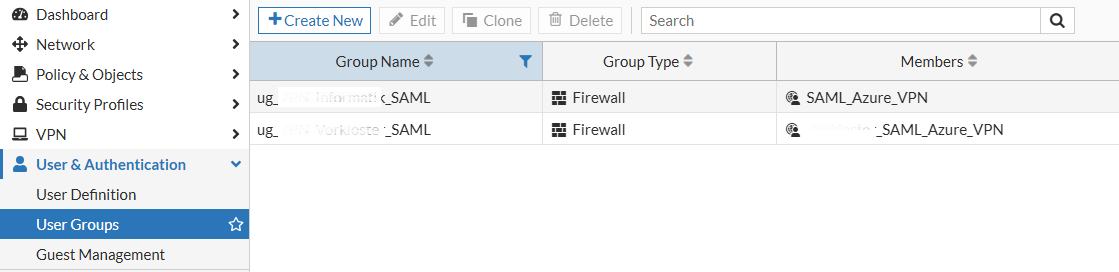
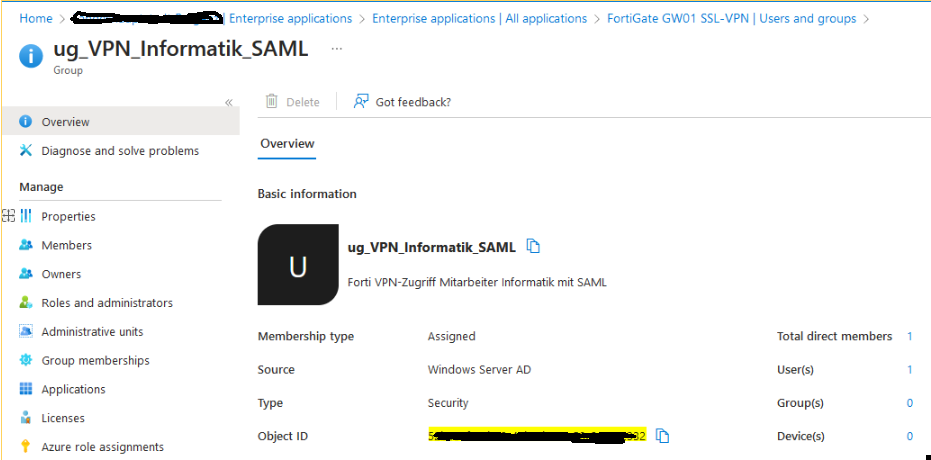
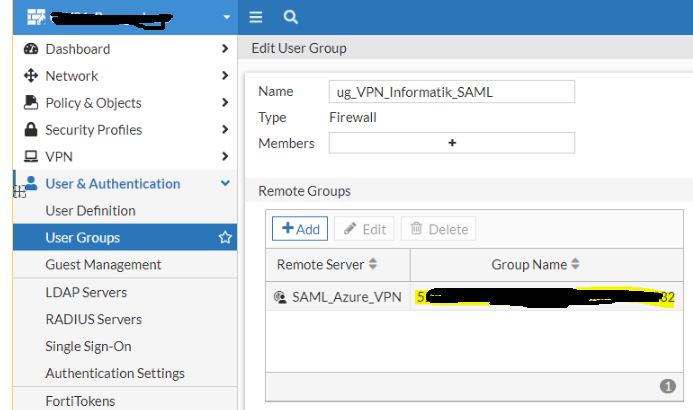
</div>Um auf eine Gruppe filtern zu können, muss als Gruppennamen die Object ID der Azure Gruppe eingetragen werden. Die Werte "username" und "groups" sind case sensitive!

[![image.png](https://maus.h09.org/uploads/images/gallery/2025-02/scaled-1680-/C3Uimage.png)](https://maus.h09.org/uploads/images/gallery/2025-02/C3Uimage.png)
[![image.png](https://maus.h09.org/uploads/images/gallery/2025-02/scaled-1680-/GDCimage.png)](https://maus.h09.org/uploads/images/gallery/2025-02/GDCimage.png)
<div class="wikimodel-emptyline" id="bkmrk--17">  
</div>**Der Rest ist Standard.**

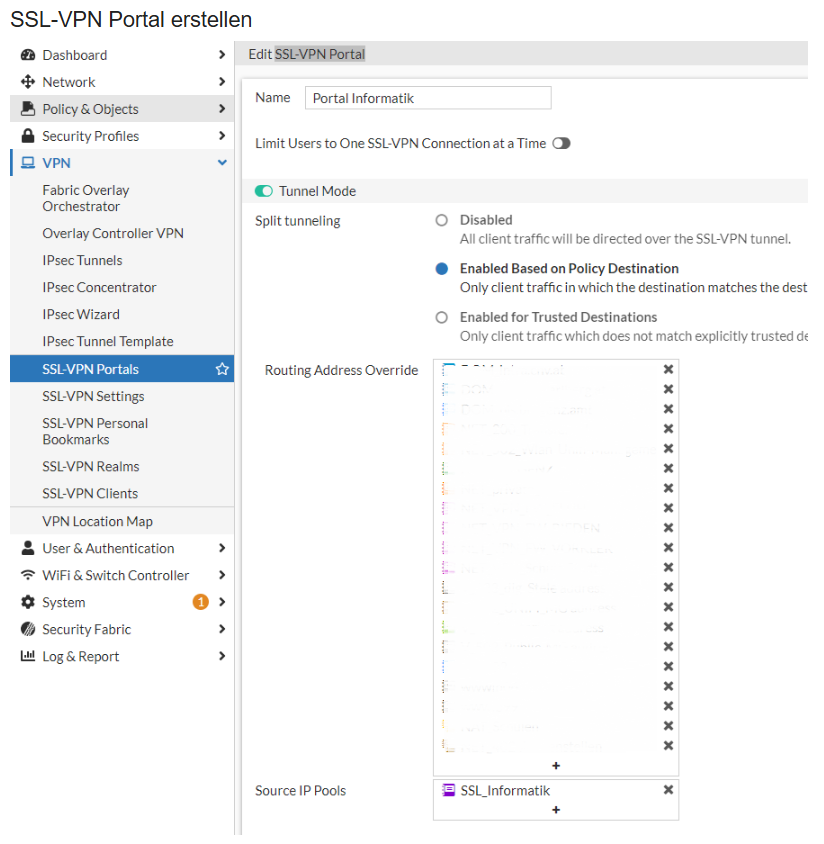
## SSL-VPN Portal erstellen

[![image.png](https://maus.h09.org/uploads/images/gallery/2025-02/scaled-1680-/EEbimage.png)](https://maus.h09.org/uploads/images/gallery/2025-02/EEbimage.png)
<div class="wikimodel-emptyline" id="bkmrk--19">  
</div>## In SSL-VPN Settings zuweisen

<span aria-label="1719407662080-460.png Bild Steuerelement" class="cke_widget_wrapper cke_widget_inline cke_widget_image cke_image_nocaption cke_widget_selected" contenteditable="false" data-cke-display-name="Bild" data-cke-filter="off" data-cke-widget-id="2" data-cke-widget-wrapper="1" role="region" tabindex="-1"><span class="cke_widget_element" data-cke-widget-data="%7B%22hasCaption%22%3Afalse%2C%22src%22%3A%22%2Fbin%2Fdownload%2FInfrastruktur%2FNetzwerk%2FFortigate%2520Firewall%2FSAML%2520Authentifizierung%2FWebHome%2F1719407662080-460.png%3Fwidth%3D718%26height%3D590%26rev%3D1.1%22%2C%22alt%22%3A%221719407662080-460.png%22%2C%22width%22%3A%22718%22%2C%22height%22%3A%22590%22%2C%22lock%22%3Atrue%2C%22align%22%3A%22none%22%2C%22resourceReference%22%3A%7B%22typed%22%3Afalse%2C%22type%22%3A%22attach%22%2C%22reference%22%3A%221719407662080-460.png%22%2C%22parameters%22%3A%7B%7D%7D%2C%22imageStyle%22%3A%22%22%2C%22border%22%3Anull%2C%22alignment%22%3Anull%2C%22textWrap%22%3Anull%2C%22classes%22%3Anull%7D" data-cke-widget-keep-attr="0" data-cke-widget-upcasted="1" data-widget="image"><span class="cke_image_resizer_wrapper">![1719407662080-460.png](https://maus.h09.org/bin/download/Infrastruktur/Netzwerk/Fortigate%20Firewall/SAML%20Authentifizierung/WebHome/1719407662080-460.png?width=718&height=590&rev=1.1)<span class="cke_image_resizer" title="Zum Vergrößern auswählen und ziehen">​</span></span></span><span class="cke_reset cke_widget_drag_handler_container" style="background: rgba(220,220,220,0.5); background-image: url('https://xwiki.bregenz.amt/webjars/wiki%3Axwiki/xwiki-platform-ckeditor-webjar/16.2.0/plugins/widget/images/handle.png'); display: none;">![](https://maus.h09.org/uploads/images/gallery/2025-02/embedded-image-7qfsgnth.gif "Zum Verschieben anwählen und ziehen")</span></span>

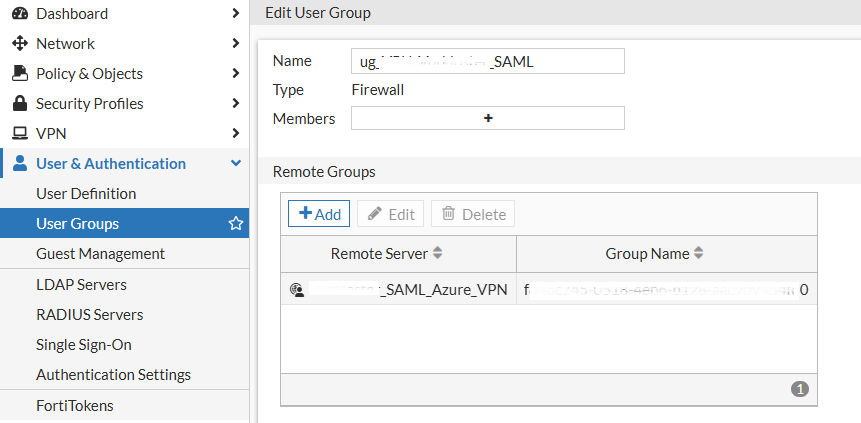
## Gruppe einer Policy zuweisen

[![image.png](https://maus.h09.org/uploads/images/gallery/2025-02/scaled-1680-/eh5image.png)](https://maus.h09.org/uploads/images/gallery/2025-02/eh5image.png)

[![image.png](https://maus.h09.org/uploads/images/gallery/2025-02/scaled-1680-/1Xuimage.png)](https://maus.h09.org/uploads/images/gallery/2025-02/1Xuimage.png)
# Debug

```shell
diag debug reset
diagnose vpn ssl debug-filter clear
diagnose debug application authd -1
diagnose debug application samld -1
diagnose debug application sslvpn -1
diagnose debug console timestamp enable 
diagnose debug enable
```

# Info

<span class="wikiexternallink">[https://yura.stryi.com/en/2021-03-05/fortigate-ssl-vpn-azure-mfa/](https://yura.stryi.com/en/2021-03-05/fortigate-ssl-vpn-azure-mfa/)</span>

<span class="wikiexternallink">[https://docs.fortinet.com/document/fortigate-public-cloud/7.4.0/azure-administration-guide/584456/configuring-saml-sso-login-for-ssl-vpn-with-entra-id-acting-as-saml-idp](https://docs.fortinet.com/document/fortigate-public-cloud/7.4.0/azure-administration-guide/584456/configuring-saml-sso-login-for-ssl-vpn-with-entra-id-acting-as-saml-idp)</span>

<span class="wikiexternallink">[https://learn.microsoft.com/en-us/entra/identity/saas-apps/fortigate-ssl-vpn-tutorial](https://learn.microsoft.com/en-us/entra/identity/saas-apps/fortigate-ssl-vpn-tutorial)</span>

<span class="wikiexternallink">[https://learn.microsoft.com/en-us/entra/identity/hybrid/connect/how-to-connect-fed-group-claims](https://learn.microsoft.com/en-us/entra/identity/hybrid/connect/how-to-connect-fed-group-claims)</span>

<span data-cke-copybin-end="1">​</span>